Order Custom Book Cover
AI Cover Rescue

Turn Your Raw AI Cover Into a Print-Ready Book Cover

Midjourney, Ideogram, DALL-E and Stable Diffusion are extraordinary at ideas and hopeless at the last mile. A striking image is a concept, not a cover. It does not have to be an AI image either: the same repair applies to a cover you already have, from an earlier designer or a template that never looked right in print. Real typography, a millimetre-accurate spine, correct bleed and a true 300 DPI print file are what stand between that image and a book a reader can actually buy.

Closing that gap, by hand, is my entire job. One flat price per package, and a watermarked proof for you to approve before anything is final.

Pay securely through PayPal. Your files go straight to my studio, never a third party.

1

You Send the File

Upload the raw AI image, choose your package, and tell me the trim size and page count. Two minutes, on this page.

2

You Pay the Flat Price

One flat price per package, paid securely through PayPal on this page. No subscriptions, and no add-on charges later.

3

You Approve the Proof

I repair the file and send a watermarked proof. Once you approve it, the print-ready files are yours.

True 300 DPI print files KDP and IngramSpark specs Flat price per package Revisions included
The Diagnosis

What Is Actually Wrong With an AI Cover

None of this is the model being bad. It is the model doing exactly what it was built to do: predict pixels that look plausible. A book cover is not a picture. It is a manufactured object with a spine that has to match a page count, a trim line that moves by up to an eighth of an inch, a barcode zone that cannot be covered, and a thumbnail on a search results page that decides whether anyone ever reads your title.

These are the ten things I find most often. The first eight are in the artwork. The last two are in the words that travel with it, because a cover is judged together with the blurb printed on the back and the copy around it. If you recognise three or more, your book is not ready to publish.

Problem 01

Typography and Lettering

Image models do not typeset. They predict pixels, so a letter is painted as a texture that resembles a letter rather than a glyph with a defined outline. There is no text object underneath, which means there is nothing to edit, re-space or fix.

  • Misspelled or garbled titles, most often on short strings
  • Pseudo-text that reads as words from across a room and dissolves into nonsense at 100 percent zoom
  • Letters drawn inconsistently, so the title looks hand-scribbled rather than set
  • No font file, so no licence and no way to correct a typo without rebuilding the artwork

Fails when: a typo cannot be corrected, and the title is illegible on Amazon.

Problem 02

Composition and Layout

Generators produce one centred square image with no concept of a book. They have never seen a spine, a hinge, a back cover or a barcode box, so none of that space is reserved.

  • A square generation cropped to a 6 by 9 portrait panel loses roughly a third of the image, often the head or hands
  • The focal subject sits dead centre, which on a wrap cover is the spine, so it gets split by the fold
  • No space left for the author name, subtitle or series line
  • Art running straight through the spine hinge, where it cannot be seen and will not align

Fails when: the subject is bisected by the fold and the title has nowhere to sit.

Problem 03

Anatomy and Physics

The best documented failure in generative imagery. Models are famously inept at hands, and the problem runs much wider than that once you look closely at a file at full size.

  • Extra or missing fingers, or fingers that merge into each other and into objects
  • Asymmetric or misaligned eyes, teeth fused into a single band, jewellery melting into skin
  • Weapons and blades that bend or taper, straps that pass through the body
  • Reflections that do not match, shadows pointing away from the light, two vanishing points in one scene

Fails when: printing at 300 DPI makes every one of these more visible than it was on screen.

Problem 04

Resolution and Print Quality

This is the one that gets files rejected. Most consumer generators output 1024 by 1024 pixels, or about 2K at best. KDP requires a minimum of 300 DPI and treats anything under 200 DPI as low resolution.

  • A 1024 pixel image placed 6 inches wide works out at about 171 DPI, below even the low resolution floor
  • Stretched across a full wrap it falls to roughly 79 DPI
  • Upscaling invents texture rather than recovering detail, so skin turns plastic and edges turn crunchy
  • Raising the DPI number in an editor changes the label, not the image

Fails when: the cover prints soft and mushy, or the upload is flagged or refused.

Problem 05

Colour and Reproduction

A screen emits light and adds colour. A press lays down ink and absorbs it. The printable gamut is materially smaller, and the missing region is exactly the bright saturated cyans, greens and violets that AI generators favour.

  • Neon gradients and vivid magenta to cyan blends print duller, muddier and often banded
  • Pure black at zero red, green and blue is a screen black. It contains no ink density and prints as a washed dark grey
  • Rich black built for large solids must never be used on small text, where it causes a registration halo
  • Out of gamut warnings are the software telling you a colour will shift. Ignoring them means you find out on the proof

Fails when: the dark cover loses all detail and no longer matches your marketing images.

Problem 06

File Format and Print Mechanics

A generator gives you a picture of a cover. A printer needs a page definition file with a trim box, a bleed box and embedded fonts. These are different kinds of object.

  • No bleed, so a white sliver appears wherever the trim lands a fraction wide
  • Live transparency, which prints with missing or distorted content unless it is flattened
  • JPEG ringing and blocking around hard edges, invisible on screen and obvious on paper
  • Banding across smooth skies and vignettes once compressed and printed
  • No embedded fonts, no crop marks and no vector output, because there is no vector underneath

Fails when: the upload is rejected, or a white edge shows on the finished book.

Problem 07

Platform Rules and Legal Exposure

The risk here is not technical, and it does not show up until after you have published.

  • KDP requires you to declare AI generated content at publishing time, and states plainly that this includes cover art
  • US Copyright Office guidance: material generated purely from a prompt is not protected by copyright, because the expressive choices were made by the technology
  • A cover you cannot register is a cover you cannot defend if another author copies it
  • Models trained on scraped images can and do reproduce protected characters, logos and likenesses, and the publisher carries the liability

Fails when: a title is removed from sale, or you hold artwork you cannot protect.

Problem 08

The Thumbnail Test

The most commercially damaging failure, and the one authors notice last. Amazon shows your cover at roughly 150 pixels tall in search results, next to dozens of competitors.

  • Dark, low contrast AI art collapses into a grey smudge at that size
  • Thin or decorative title type disappears entirely
  • Busy detail that looked impressive full size becomes visual noise
  • Series covers do not repeat, because the generator cannot hold a style across runs

Fails when: the cover is unreadable in search, so nobody clicks, whatever the book is worth.

Problem 09

The Blurb and the Back Cover Copy

An AI cover arrives as a single flat image, so there is no back cover and no blurb to go with it. Most authors write one in a hurry, or ask a chatbot for one, and paste it in without reading it aloud. The blurb is the second biggest lever you have after the cover itself: it is what converts the click into the sale.

  • It summarises the plot instead of selling the hook, so it reads like a synopsis rather than an invitation
  • It opens with filler such as "In a world where" or "Nothing is as it seems", which signals a book written by a template
  • It runs far too long for the back cover panel, so it gets shrunk to a size nobody can read on a shelf
  • The first two lines carry no genre signal, so a browsing reader cannot tell what kind of book this is
  • It contradicts the book: the wrong tense, the wrong point of view, or a character named differently inside
  • The author bio is a career history rather than one line of why you are worth reading

Fails when: the cover earns the click and the blurb loses the sale, on the same page.

Problem 10

Typos, Spelling and Grammar

This is the part nobody checks, because it is the part that was never generated for you. The image tool painted some text as texture and got the letters subtly wrong. The rest of the words you typed yourself, at the end of a long day. Both end up in front of a reader at the same time.

  • Misspelled text baked into the artwork: a tagline, a series name or a fake publisher line, with letterforms that are subtly wrong
  • Your name spelled one way on the cover and another way on the title page, which also breaks the search for your own book
  • Title case and subtitle case applied inconsistently, so the same words are capitalised two different ways
  • British and American spelling mixed inside one paragraph of the blurb
  • Straight quotes in one place and curly quotes in another, doubled punctuation, or a missing full stop at the end of the blurb
  • A tagline that repeats or contradicts the subtitle printed directly above it

Fails when: a reader spots a typo in the first thing they ever see of your book, and assumes the inside is the same.

Before and After

The Same Cover, Rescued

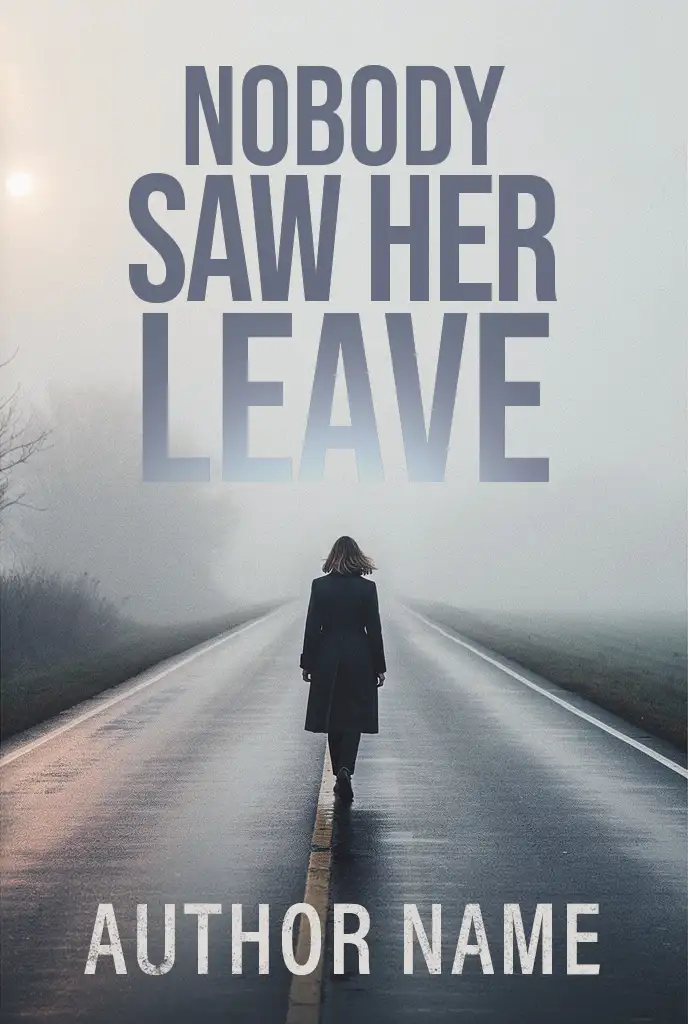
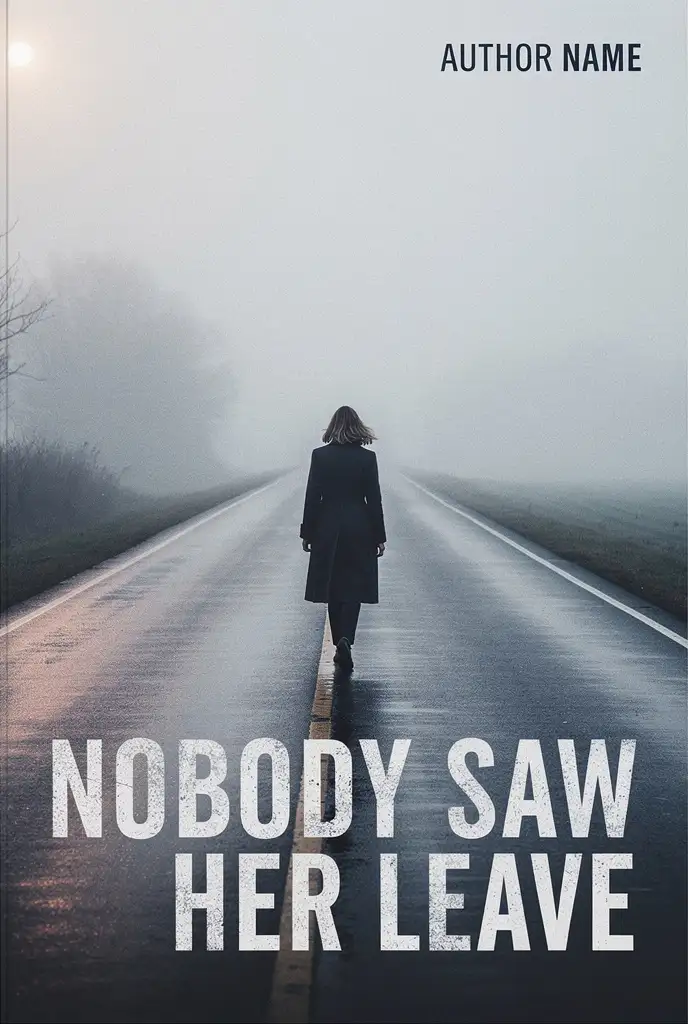
Same artwork, same title, same author line. What changed is where the words sit and what they are set in. That is the entire job, and it is the difference between a striking image and a cover that sells a book.

A raw AI generated thriller cover: the title sits in distressed white capitals across the bottom of the frame over the wet road, with a small AUTHOR NAME line in the top right corner Before
Straight out of the generator. The title is doing its best with nowhere to go.
The same thriller cover after rescue: the title is stacked in the fog at the top in clean geometric capitals, and the figure walks clear of the type After
Rebuilt. The title sits in the fog, the figure is left alone, and the author line finally reads at thumbnail size.

The Title Moved Into the Fog

Behind the old title the background swings 101 levels of luminance, because the wet road, its centre line and the reflections all run through the letters. Behind the new one the same measurement is 28. That is the whole case for moving the words into the fog: the type finally sits on a field that does not compete with it.

The Title Was Given Twice the Room

The block went from two lines in the bottom fifth to three in the upper half, so it now covers 48 percent of the cover instead of 21. At the hundred pixels wide a search result actually shows, a line of the title went from about ten pixels tall to about sixteen. Bigger type is what survives being shown small.

The Distress Moved Off the Title

The eroded face was not thrown away, it was demoted to the author line, where it costs nothing. The title now uses a clean geometric grotesque with open counters and even strokes, so the words hold their shape and the texture stops competing with the wet road underneath them.

The Author Line Was Promoted

27 pixels of cap height in the top right corner, set in black on pale fog, was the least legible thing on the cover. It is now 72 pixels along the bottom in white on the dark road. At the hundred pixels wide a search result shows, that is 2.6 pixels against 7.0, which is the difference between a smudge and a name.

The Title Colour Agrees With the Art

The first title is flat white, the brightest value in the frame, so the words pull the eye before the figure does. The rebuild takes its colour out of the mist instead, a cool slate that belongs to the picture rather than sitting on top of it.

The Stack Was Rebuilt for the Format

Two long lines spanning 85 percent of the width became three shorter ones, the widest of which spans 62 percent. A narrower block has real margins on both sides and sits clear of the road's centre line, so the title, the figure and the road each get to do their own job.

None of this is retouching the art. It is the typography and the composition, which is exactly what a generator does not do. Send me your cover and I will tell you what yours needs.

The Numbers

What Your File Has to Hit

These are not design opinions. They are the published requirements of the two platforms you are most likely to publish on, and they are what a print-ready cover is measured against.

Anatomy of a Print-Ready Wrap

A paperback cover is one continuous sheet that wraps from the back, across the spine, to the front. Every zone below is a number, not a guideline.

BACK COVER blurb and barcode live here FRONT COVER title, art and author name SPINE 0.6756 in 12.9256 in for a 300 page 6 x 9 on white paper Barcode zone 2 x 1.2 in, keep clear of artwork
Bleed, 0.125 in past the trim, cut off Trim line, the finished edge Type safe area, 0.25 in inside the trim Barcode zone, 2 x 1.2 in, never cover it

KDP and IngramSpark, Side by Side

Where the two platforms agree, one file serves both. Where they disagree, the stricter figure wins. The spine width is the one value you must confirm against the printer you are actually using, because it depends on the paper stock and the final page count.

Requirement Amazon KDP IngramSpark Use this
Resolution 300 DPI minimum, under 200 DPI is low resolution 300 ppi, under 200 ppi may be rejected 300 ppi
Colour space CMYK recommended, profiles removed on upload CMYK required, RGB is converted for you and may shift CMYK
PDF standard Flattened PDF, no specific standard PDF/X-1a:2001 or PDF/X-3:2002 PDF/X-1a:2001
Cover bleed 0.125 in on top, bottom and outside edges 0.125 in on all sides 0.125 in all sides
Text distance from trim At least 0.125 in 0.25 in recommended 0.25 in
Fonts Must be embedded Must be embedded, or the file is rejected Embedded
Transparency Flatten before upload Flattened as part of PDF/X Flattened
Crop and registration marks Remove them Remove them Removed
Spine text minimum 79 pages 48 pages 79 pages
Clearance each side of spine 0.0625 in 0.0625 in for spines 0.35 in and over 0.0625 in
Barcode clear zone 2 x 1.2 in suggested, 1.4 x 0.8 in minimum 1.75 x 1 in if you supply none 2 x 1.2 in
Rich black for large solids Built for print, no recipe published C 60 M 40 Y 40 K 100, total ink under 240 percent 60/40/40/100
Black for text 24 pt and under Plain black 100 percent K only 100 percent K
Cover file size ceiling 650 MB, under 40 MB advised 1.5 GB on web upload Under 40 MB

KDP figures from the KDP help pages on paperback covers, trim and bleed, barcodes and image formatting. IngramSpark figures from the IngramSpark File Creation Guide and Catalog Integrity Guidelines. IngramSpark does not publish a static spine table, so spine width comes from their template generator or spine calculator.

If Your File Is This, Here Is the Problem

The most common failures I see, and what each one actually costs you.

Your file The problem The fix
1024 px square image About 171 DPI at 6 inches wide, below the 300 DPI requirement and below the low resolution floor Rebuild the artwork at 1875 by 2775 px or larger for a 6 x 9 front panel. Upscaling is not a substitute
RGB or sRGB export IngramSpark converts it for you and the colours shift. KDP removes embedded profiles Convert to CMYK and proof it, checking the out of gamut warnings before export
No bleed A white sliver appears wherever the trim lands a fraction outside the artwork Extend the background 0.125 in past the trim on all four sides
Spine width guessed Spine text wraps onto the front or back cover, or the file is refused Recalculate from the final page count and the paper stock, then confirm against the platform template
Text in the barcode zone KDP rejects the cover outright. IngramSpark prints its barcode straight over your artwork Keep a clear 2 by 1.2 in zone in the lower right of the back cover
Rich black on small text A four plate halo around every letter on press Use 100 percent K alone for any text at 24 pt or below
Live transparency Elements print missing, distorted or with a visible edge Flatten every layer before export
Fonts not embedded IngramSpark rejects the file. KDP substitutes a font and your title changes shape Embed all fonts and confirm the PDF font list reads embedded or embedded subset
Crop marks left in The marks can print onto the finished cover Remove crop, printer and registration marks from the cover file
Title illegible at 150 px No rule is broken, but nobody clicks the book in search results Increase title size and contrast until it reads at thumbnail size, then check again in greyscale

Already Have a Cover?

Fix an Existing Book Cover, Not Just an AI One

Book cover repair is the same job whether the file came out of Midjourney or from an earlier designer, a template you assembled yourself, or a cover that was already rejected on upload. If the artwork is soft at print size, the type is wrong, the spine does not match the page count, or the back cover was never designed at all, that is what I fix. You keep the cover you chose: the composition, the palette and the mood stay, and what changes is the craft. A full redesign is a different job, and I will say so plainly if that is what your file actually needs. If you would rather start from a finished design instead, there are premade book covers sold once only, or you can commission a custom cover from scratch.

Front, Back and Spine

Back Cover Design Is Half the Book

A generation gives you a front. A paperback needs the whole wrap: a back cover design that carries the blurb and the hook, a barcode zone the printer can actually read, room for the author photo and the imprint, and a spine width calculated from your page count and paper stock to the millimetre. Get the spine wrong and the type drifts onto the fold. Get the barcode zone wrong and the file bounces at upload. Back cover design, the spine calculation and the print wrap are all part of the Print Wrap package, and the copy on the back is proofread while I am in there.

Recognised Your Cover in That List?

Send me the file and choose your package. You pay the flat price through PayPal, and then I audit the file against the print specification and tell you exactly what is wrong and what it takes to fix.

Fix My AI Cover
The Process

From Raw Image to Finished Cover

Six steps, one flat price per package, paid securely through PayPal when you send the file.

  1. 1

    You Send the File and Choose Your Package

    Upload the raw generation, pick the package that matches what you need, and tell me the trim size, page count and where you are publishing. If you are unsure about any of it, say so and I will work it out.

  2. 2

    You Pay the Flat Price

    The package price is paid through PayPal as soon as the form is in, and the work starts as soon as it clears. No subscriptions, no add-on charges later, and nothing charged beyond the package you chose.

  3. 3

    I Audit the File Against the Specs

    I open the file, measure it, check the resolution and colour space, and identify every defect that will show up on press or on Amazon. If it turns out the file cannot be rescued at the size you sent, I tell you straight away rather than deliver something that will not hold up.

  4. 4

    The Artwork Gets Repaired

    Every artifact is corrected by hand rather than filtered: hands, eyes, edges, reflections, impossible geometry. Then the file is rebuilt at print resolution and colour graded for ink rather than for a screen.

  5. 5

    Typography, the Wrap and the Words Are Built

    The title is set in real type rather than painted, so it can be corrected, kerned and licensed. The spine is calculated from your page count and paper stock, the back cover is designed, the barcode zone is placed and kept clear, and the blurb is edited and set at a size that reads on a shelf. I also proofread the title, the subtitle, the tagline, the blurb and the bio, and correct any text the AI painted into the artwork itself.

  6. 6

    You Approve the Proof, Then the Files Are Yours

    You see a watermarked proof first. Once you approve it the watermarks come off and you receive the print-ready PDF, the ebook cover file and everything the printer needs.

What I cannot do: I cannot make a 1024 pixel generation genuinely sharp at print size, and I will not pretend otherwise. If your image turns out to be too small to work with, I will tell you and refund you before any work begins, and the options are to regenerate at higher resolution or to build a new cover.

Interior Problems Too?

Your Book Has an Inside as Well

Most authors who arrive here with an AI cover have the same problem on the inside: a Word file that will not convert, margins that fight the gutter, headers that appear where they should not, and page numbers that start on the wrong page. Interior formatting for print and ebook is a separate service, and it is the difference between a file the printer accepts and a file the printer bounces back.

Order Formatting
The Packages

Three Ways to Rescue It

One flat price per package. No hidden fees, and you approve the proof before anything is final.

Front Cover Rescue

$149

Ebook ready

  • Hand repair of every AI artifact in the artwork
  • Rebuilt at true 300 DPI print resolution
  • Colour graded for print rather than screen
  • Title, subtitle and author name set in real, licensed type, then proofread and corrected
  • Front cover file for ebook, JPG and PNG
  • Revisions until you approve the proof
Choose Front Cover Rescue

The Print Wrap

$249

Paperback and ebook

  • Everything in Front Cover Rescue
  • Spine width calculated from your page count and paper stock
  • Full back cover design, blurb typeset and placed
  • Barcode zone placed and left clear to spec
  • Bleed, trim and type safe area aligned to the KDP and IngramSpark templates
  • Print-ready paperback PDF plus the ebook cover
Choose The Print Wrap

Not sure which one you need? Pick the closest package and say so in the notes. If your file needs something different, I will tell you before the design work starts.

Questions

Before You Send the File

Can you fix a 1024 pixel AI image?
Sometimes, and I will be honest about it rather than take the job and hope. A 1024 pixel generation cannot be made genuinely sharp at print size, because the detail was never captured. What I can do is repair the artwork, rebuild it at print resolution with hand-painted detail over the weakest areas, and grade it so it holds up. That works well for painterly and illustrated covers and poorly for anything that depends on fine texture. If it will not work, I will say so and refund you before any work begins.
What exactly do you send back?
For the front cover package: a high resolution front cover image and the ebook cover file. For the print wrap: a flattened, print-ready PDF of the full wrap with the correct spine, bleed and type safe area, plus the ebook cover. For the complete bundle: the wrap, the ebook cover, a hardback jacket built to the hardcover spine width, an audiobook cover, and a set of 3D mockups for your launch and advertising.
Do you fix the blurb and the typos as well?
Yes, and they are worth fixing at the same time as the artwork. The blurb is the second biggest lever you have after the cover, so I tighten the hook, cut the filler, and set it on the back cover at a size that is actually readable on a shelf. On the copy I proofread the title, the subtitle, the tagline, the blurb and the author bio. I also check the text baked into the artwork itself, because image models frequently paint a tagline with the wrong letterforms and it is easy to miss at full size. Paste whatever you have into the copy field on the form.
How do I pay, and when does the work start?
You choose your package on the form, send the files, and pay it through PayPal straight away, on this page. Work starts as soon as the payment clears. The price you see is the price you pay: there are no add-on charges later, and nothing is charged beyond the package you selected. If you would rather pay another way, reply to the confirmation email and I will send a PayPal invoice instead.
Do you format the inside of the book as well?
Interior formatting is a separate service rather than part of a cover package, because the two jobs need different files and a different amount of time. If the inside of your book is also a Word file that will not convert, or your margins fight the gutter, you can order that separately from the interior formatting page.
Will my cover pass the KDP upload check?
The files are built to the published requirements: 300 DPI, CMYK, flattened, fonts embedded, no crop marks, 0.125 inch bleed, the spine calculated from your page count and paper stock, and a clear barcode zone. That is what the automated checks look for. I cannot promise an outcome on your account, and any designer who does is guessing, but the file will be correct against the specification.
Do I need to declare the cover as AI generated?
On KDP, yes if the image was generated by AI, and their guidelines state that this includes cover art. That obligation sits with you as the publisher, and it is worth reading their content guidelines directly. Separately, US Copyright Office guidance is that material generated purely from a prompt is not protected by copyright, which is worth knowing before you build a brand around it. None of that stops you publishing. It is just better to know it now than later.
What if I only have the image and no page count yet?
That is completely normal, and it is why the page count is optional on the form. Send what you have. If you need the print wrap, the spine width depends on the final page count and paper stock, so we settle that before the wrap is built. If you are still writing, the front cover package does not need it at all.
Can you keep the exact look I already have?
Yes. The starting point is your image, and the goal is to make the cover you already chose publishable rather than to replace it with mine. Composition, palette and mood stay. What changes is the craft: the defects, the resolution, the colour for ink, and the typography.
How many revisions do I get?
Revisions are included until you approve the proof. Within the scope you agreed there is no revision limit, because a cover you are not happy with is not a finished cover. Changes that move the scope, such as a different title or a new direction for the artwork, are quoted separately and always agreed with you first.
What file types can I upload?
Images (JPG, PNG, WebP, TIFF, HEIC), PDFs, and working files such as PSD, AI, EPS or a ZIP. Up to ten files at 100 MB each, and the upload happens straight from your browser to my own Google Drive, so a large layered file is fine. The second upload box is for anything else that helps: an author photo, a logo, a manuscript file, or a reference image you want the cover to match.
Can you fix a book cover that was not made with AI?
Yes. The starting point does not have to be a generation. A cover from an earlier designer, a template you built yourself, a stock image with type laid over it, or a file that was already rejected on upload all get the same treatment: the artwork is repaired, the resolution and the colour are rebuilt for ink, and the typography is set properly. If you would rather start again from a finished design instead, there are premade covers sold once only.
Do you design the back cover as well as the front?
On the Print Wrap and the Complete Publishing Bundle, yes. The front cover package is the front only. The wrap adds a designed back cover carrying your blurb, the barcode zone, the author photo and the imprint, plus the spine width calculated from your page count and paper stock and the bleed and safe area the printer needs.
How much does it cost to fix a book cover?
One flat price per package: $149 for the front cover, $249 for the full print wrap with the spine and the back cover design, and $299 for the bundle with the hardback jacket and the audiobook cover. The price you see is the price you pay. There are no add-on charges later, and nothing is charged beyond the package you selected.
Start Here

Send Me Your AI Cover

Fill this in, attach the file and choose your package. The package price is paid through PayPal on the next step, and the work starts as soon as it clears.

About You
About the Book

Used to calculate the spine width for a print wrap.

Where are you publishing?
Formats you need
Package *
What have you noticed? (tick anything that applies)
Your cover file *

Drop your cover file here, or click to browse

JPG, PNG, WebP, TIFF, HEIC, PDF, PSD, AI, EPS or ZIP. Up to 100 MB per file.

    Anything else to work with (optional)

    Add an author photo, a logo, or any other file

    Headshots, logos, manuscript files, reference images, anything that helps. Up to 100 MB per file.

      Up to 10 files in total across both boxes, 100 MB each.

      Pasted exactly as you have it. I will come back with a corrected version and the changes marked.

      Your files go straight to my own Google Drive, never a third party, and your details are never sold or shared. Payment comes next, through PayPal.

      Prefer email? Write to contact@coverbynabin.com

      Fix My AI Cover